npd-node-replace
简介
npd-node-replace 组件用于缓解当前 Amazon EKS 在中国区EKS 集群中的问题节点无法被及时处理的痛点 推荐使用当前最新版本为 v0.1.2 (https://github.com/normalzzz/npd-node-replace/releases/tag/v0.1.2)
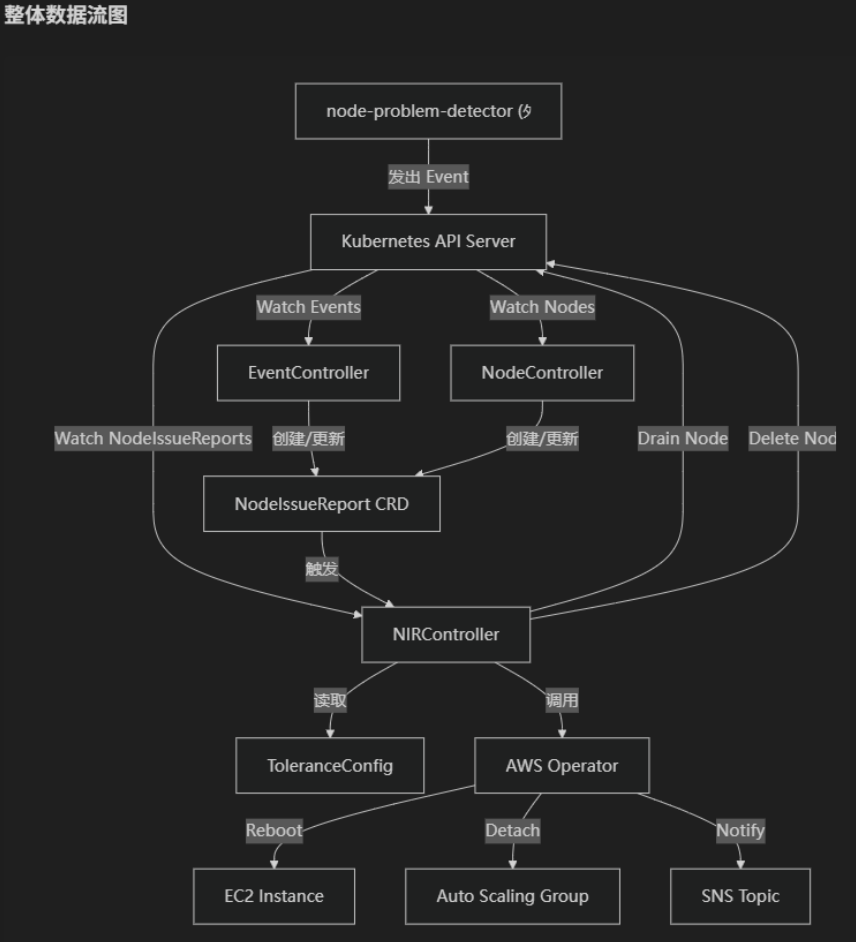
npd-node-replace 的主要功能如下:
- 侦听来自 npd 的关于节点问题的报告事件
- 将节点的问题事件记录在 NodeIssueReport 中
- 根据用户配置的 Tolerance 配置 进行节点的自动替换或重启
- 通知集群 Admin 节点上发生的历史问题事件
- 监控节点状态,当节点状态为 NotReady 时,进行节点替换,(节点的替换操作依赖于针对节点的两次状态检查,在节点状态由 Ready 变为 Notready 三分钟之后,会再次检查节点的状态,若节点状态仍为 Notready,则会进行节点替换,若节点状态变为 Ready ,则认为节点正常)
- 当前 npd-node-replace 组件处于 pre release 阶段,为了集群稳定性,默认情况下不会对节点处理,只有在节点上拥有 “npd-node-replace-enabled=true” 才会对节点进行处理,否则只对节点进行问题监控和收集报告
kubectl label nodes <node name> npd-node-replace-enabled=true(v0.1.1 版本为黑名单机制,标签为 npd-node-replace-disabled=true, 在 v0.1.2 版本推出修改) - 代码结构详解:https://deepwiki.com/normalzzz/npd-node-replace
重要(使用之前请重点阅读)
- npd-node-replace 组件仅侦听 EKS 托管节点组中节点的事件, 不会处理 Karpenter 节点问题
- npd-node-replace 组件属于个人项目,并不属于 Amazon Web Service 中国区,如果遇到问题请提交 Issue, issue 会被及时处理
- npd-node-replace 组件当前仍处于测试开发阶段,请在详尽的测试和考虑之后使用在 EKS 集群中。
- 请将 npd-node-replace 组件部署在 fargate 计算资源上,关于如何在 EKS 使用 fargate 可以参考文档
- npd-node-replace 组件的 reboot 和 replace 组件都会进行节点 drain 操作,若发现 Pod 驱逐失败的问题,请检查集群中 PDB 配置,例如 coredns pod 组件存在 PDB 配置若您集群的 coredns pod 都处于同一节点上,推荐使用 “npd-node-replace-disabled=true” 标签来对该节点禁用 npd-node-replace 组件的 replace 和 reboot 操作,
- 关于 coredns pod 的配置,在测试环境中发现了已知问题:
- 当 coredns 组件被 PDB 保护(默认 MaxUnavailable=1 )但是其余节点没有容量调度 Coredns pod,则会造成 coredns pod 的调度失败, reboot 或者 replace 操作之前的 drain 操作会失败,导致整个 reboot 和 replace 流程停滞
- 当 coredns 组件均分布于同一节点,同时为了成功驱逐 coredns pod,您手动修改了 coredns PDB 配置,导致 coredns pod 都被驱逐,但是当其余节点都没有容量运行新的 coredns pod 时,会造成集群中的域名解析服务 kube-dns 不可用,导致整个集群的问题。
- 故推荐当 coredns pod 都处于同一节点,同时集群中存在资源紧张问题的时候,请使用 “npd-node-replace-disabled=true” 标签为该节点禁用 npd-node-replace 组件,防止集群问题。
- 节点 Reboot 期间,kubelet 无法向 API server 汇报状态,节点状态可能会转变为 NotReady ( API server 参数 –node-monitor-grace-period 配置) ,该节点状态改变会被本组件的 node controller 捕获到,并创建出新的 NodeIssueReport 资源用于记录。如果在超过 grace time, 节点状态 double check 的时候,节点仍未转变为 Ready 状态,则节点会被替换。这种情况是我们不希望的。 故使用 npd-node-replace 组件之前,需要对节点重启所需的时间进行估计,并通过 values.yaml 中的 nodeDoubleCheckGraceTime 参数进行调整。或直接调整模板 npd-node-replace-deployment.yaml 中 Deployment.spec.template.spec.containers 中定义的环境变量 NODE_DOULBE_CHECK_GRACE_TIME 的值(以分钟为单位),如下为示例:
        - name: NODE_DOULBE_CHECK_GRACE_TIME
          value: "5"   # the grace time for double check before replacing node, in minutes, default is 3 minutes
整体架构:
NodeIssueReport 生命周期:
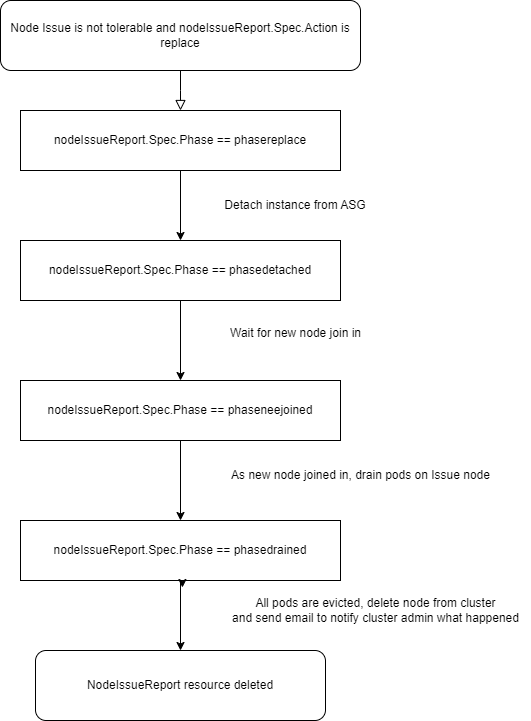
Node Replace:
Node Replace:
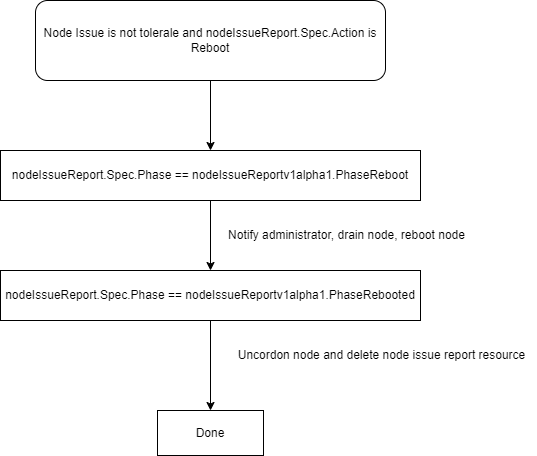
镜像构建:
您可以使用如下命令进行镜像构建,并将镜像推送到镜像仓库,例如 Amazon ECR
docker build -t npd-node-replace .
对于中国区用户,可以使用如下命令:
docker build -t npd-node-replace -f ./Dockerfile_cn .
Node controller 控制节点生命周期(Action: replace):
- 当节点状态从 Ready 转变为 Unknown 或 NotReady 时,会被 Node controller 捕获到节点状态的改变,
- 为了防止节点抖动造成节点频繁被替换,使用 delayworkqueue 引入 double check 机制,在节点被发现状态转变为 NotReady 或者 Unknown 时候,会首先记录下来,并在 grace time (当前为 3 min)之后,再次检查节点状态,如果节点状态转为 Ready ,则 NotReady 消除记录,认为节点正常, 如果节点状态在第二次检查时,仍然为 NotReady,则对节点替换。
- 当前已经发现的限制: 如果同一节点在 grace time 之内,状态在 NotReady 和 Ready 状态反复变换,仅会以第一次状态转为 NotReady 的时间作为基准,在 grace time 之后再次检查节点转台,grace time 内由于节点状态转变而反复触发的 Node Update 不会在 grace time 之后再次进行节点状态检查(delayingworkqueue 原生的去重机制)。
- 重要:节点 Reboot 期间,kubelet 无法向 API server 汇报状态,节点状态可能会转变为 NotReady ( API server 参数 –node-monitor-grace-period 配置) ,该节点状态改变会被本组件的 node controller 捕获到,并创建出新的 NodeIssueReport 资源用于记录。如果在超过 grace time, 节点状态 double check 的时候,节点仍未转变为 Ready 状态,则节点会被替换。这种情况是我们不希望的。 故使用 npd-node-replace 组件之前,需要对节点重启所需的时间进行估计,并通过 values.yaml 中的 nodeDoubleCheckGraceTime 参数进行调整。或直接调整模板 npd-node-replace-deployment.yaml 中 Deployment.spec.template.spec.containers 中定义的环境变量 NODE_DOULBE_CHECK_GRACE_TIME 的值(以分钟为单位),如下为示例:
        - name: NODE_DOULBE_CHECK_GRACE_TIME
          value: "5"   # the grace time for double check before replacing node, in minutes, default is 3 minutes
部署
npd-node-place 依赖 node-problem-detector 组件侦听事件,请先部署 node-problem-detector
Tolerance 配置:
Tolerance 配置中可以配置对于某些问题发生问题的容忍次数,示例配置:
{
  "tolerancecollection": {
    "OOMKill": {
      "times": 2,
      "action": "reboot",
      "timewindowinminutes": 30
    },
    "KernelHang": {
      "times": 3,
      "action": "replace",
      "timewindowinminutes": 60
    }
  }
}
使用该配置,可以实现在30分钟内触发两次 OOMKill 事件之后重启节点,在60分钟内触发三次 KernelOops 事件之后,替换节点。 由于事件为 Node Problem Detector 组件发出,关于所有支持的事件类型,可以参考 Node Problem Detector config Tolerance 配置字段解释:
"tolerancecollection": {
    "OOMKill": {  // 事件类型
      "times": 2,  // 在指定窗口期内发生的次数
      "action": "reboot",  // 对于某种事件类型发生次数超过阈值时,应该采取的操作
      "timewindowinminutes": 30  // 时间窗口大小
    },
根据您的 Tolerance 配置需要修改 tolerance configmap
IAM 权限配置:
npd-node-replace 组件需要结合 Amazon EC2、Amazon Autoscaling group 、Amazon SNS 服务,您需要为其配置权限。
建议通过 IRSA 的方式为 npd-node-replace pod 赋予 Amazon Web Services 权限。
修改 sevice account 配置清单,添加与 IAM role 的关联,如下,您需要将
apiVersion: v1
kind: ServiceAccount
metadata:
  annotations:
    eks.amazonaws.com/role-arn: <irsa iam role arn>
  creationTimestamp: null
  name: npd-node-replace-sa
  namespace: kube-system
创建 IAM 策略,IAM role 最小权限如下:
{
    "Version": "2012-10-17",
    "Statement": [
        {
            "Sid": "Statement1",
            "Effect": "Allow",
            "Action": [
                "ec2:RebootInstances",
                "ec2:DescribeInstances",
                "autoscaling:DetachInstances",
                "sns:Publish"
            ],
            "Resource": [
                "*"
            ]
        }
    ]
}
IRSA 的创建方式您可以参考: https://docs.amazonaws.cn/eks/latest/userguide/iam-roles-for-service-accounts.html
npd-node-replace-deployment.yaml 配置:
环境变量配置:
在 npd-node-replace-deployment.yaml 中您需要在 Deployment.spec.template.spec.env 的如下环境变量中添加 SNS Topic ARN:
        - name: SNS_TOPIC_ARN
          value: <amazon sns topic arn>
image url 配置:
需要在如下 Deployment.spec.template.containers[“npd-node-replace”].image 部分替换为您之前创建的容器镜像 URL:
      containers:
      - image: <image_url>
        name: npd-node-replace
部署模板:
- 部署 CRD:
kubectl apply -f config/crd/nodeissuereporter.xingzhan.io_nodeissuereports.yaml - 使用 kubectl apply 模板:
kubectl apply -f deploy/npd-node-replace-clusterrole.yaml
kubectl apply -f deploy/npd-node-replace-clusterrolebinding.yaml
kubectl apply -f deploy/npd-node-replace-sa.yaml
kubectl apply -f deploy/tolerance-configmap.yaml
kubectl apply -f deploy/npd-node-replace-deployment.yaml
Helm 部署
Helm package link : https://github.com/normalzzz/npd-node-replace/blob/main/deploy/npd-node-replace/npd-node-replace-0.1.2.tgz
- values.yaml 参数配置文件修改:
```yaml
kubernetesClusterDomain: cluster.local
npdNodeReplace:
npdNodeReplace:
env:
snsTopicArn:
image: repository: zxxxxzz/npd-node-replace tag: v1 imagePullPolicy: Always replicas: 1 sa: serviceAccount: annotations: eks.amazonaws.com/role-arn: toleranceConfig: toleranceJson: |- { "tolerancecollection": { "OOMKilling": { "times": 2, "action": "reboot", "timewindowinminutes": 30 }, "KernelOops": { "times": 3, "action": "replace", "timewindowinminutes": 60 } } }
- <sns topic arn> 修改为 EKS 集群账户中存在的 Amazon SNS Topic ARN
- npdNodeReplace.npdNodeReplace.image 中的 zxxxxzz/npd-node-replace:v1 镜像存在于 Docker 官方,如果在中国大陆遇到镜像无法拉取的问题,请将镜像转移到 Amazon ECR 并将该字段替换为 Amazon ECR 镜像 URL,详细操作步骤可以参考 [Amazon ECR 官方文档](https://docs.amazonaws.cn/AmazonECR/latest/userguide/docker-push-ecr-image.html)
- sa.serviceAccount.annotations 中 <IRSA IAM role arn> 请替换为 [IAM 权限配置](https://github.com/normalzzz/npd-node-replace?tab=readme-ov-file#iam-%E6%9D%83%E9%99%90%E9%85%8D%E7%BD%AE) 部分创建的 Amazon IAM Role ARN **通过 Helm chart 创建的 service account 所处的命名空间(namespace) 以及 service account name 会与您 helm install 时传入的 release name 和 namespace 参数相关,请检查 Amazon IAM role 的信任实体中的 service account 信息与您当前集群中的 service account 信息一致**
- toleranceConfig 部分请根据业务需求修改,参考[Tolerance 配置](https://github.com/normalzzz/npd-node-replace?tab=readme-ov-file#tolerance-%E9%85%8D%E7%BD%AE)部分

2. 安装 release:
`helm install <release_name> <Helm Chart Path> -n <namespace> -f values.yaml`
或
`helm install <my-release> oci://registry-1.docker.io/zxxxxzz/npd-node-replace --version 0.1.0`

3. 卸载 release:
`helm uninstall <release name> -n <namespace>`

# 测试:
可以使用如下方式注入实例系统问题:
OOMKilling 问题模拟:
```bash
echo "Killed process 1234 (myapp) total-vm:102400kB, anon-rss:51200kB, file-rss:2048kB" | sudo tee /dev/kmsg
KernelOops 问题模拟:
echo "<1>BUG: unable to handle kernel NULL pointer dereference at 0x00000000" | sudo tee /dev/kmsg
echo "<1>divide error: 0000 [#1] SMP" | sudo tee /dev/kmsg
根据仓库中的示例配置,在使用上述方式触发两次 OOMKilling 事件之后,会发生节点重启。 触发三次 KernelOops 事件之后,会发生节点替换。且在节点重启和替换之后,在 npd-node-replace-deployment.yaml 中配置的 SNS topic 会受到邮件提醒,通知节点发生过的历史问题。
npd-node-replace 资源消耗评估:
[root@Test ~]# kubectl top pod npd-node-replace-5c67496ffd-gkg2w -n kube-system
NAME                                CPU(cores)   MEMORY(bytes)
npd-node-replace-5c67496ffd-gkg2w   1m           7Mi
TODOS:
- 处理节点 NotReady 状态 <– DONE 需要测试
- 通过节点 label 对节点做黑名单,发现问题时仅发送邮件通知管理员,但是不将节点移除集群。<– DONE 需要测试。
- drain 节点时引入重试机制 <– DONE, 需要测试
- 加入对节点 grace time 的支持 <– DONE 需要测试
- 添加 NIR 资源的阈值处理(超过触发告警,发送邮件)
- 细分处理节点 unknown 和notready 状态
const (
 ConditionTrue    ConditionStatus = "True"
 ConditionFalse   ConditionStatus = "False"
 ConditionUnknown ConditionStatus = "Unknown"
)